
Aspire - CMS Application where people can Manage and Post their Articles & Events.
Web Design
UX
Dashboard


CMS Application - Aspire
Aspire is Infogain’s internal portal that brings together tools like leave management, calendars, and other employee apps. The CMS (Content Management System) module lets admins create and share events, articles, and posts across the portal. Content can also be targeted to employees based on their work location for higher relevance.
Overview
🌏 Setting the scene
Aspire is an internal portal at Infogain that serves as a central access point for multiple employee-facing tools, including leave management, calendars, and internal communications. Over time, the portal became fragmented with outdated designs and inconsistent user experiences across modules.
Internal communication - such as sharing events, announcements, and updates - was largely handled through manual emails, making the process time-consuming for HR/Admin and difficult for employees to track or revisit information. There was a clear need for a centralized, role-based solution that could streamline content creation, improve discoverability, and deliver relevant updates to employees more effectively.
This project focused on redesigning the CMS module within Aspire to modernize the experience, reduce communication overhead, and create a scalable foundation supported by a consistent design system.
🧩 The Problem
The Aspire internal portal had an outdated interface and inconsistent design across modules. Creating and sharing content—such as events, articles, or announcements through mails and viva engage was time-consuming and lacked flexibility. Admins struggled to target information to specific employee groups (e.g., by work location), which reduced relevance and engagement.
communication effort was spent on
Drafting and Managing repetitive emails
of employees missed
at least one important Update per month
1-2
hrs/day
lost in
Follow-ups and Clarifications by HR/Admin
Diving into problem
🎩 Analysis of existing solution
Currently, creating and sharing updates was done manually. Admins had to draft emails and send them separately to employees, which made the process slow, repetitive, and inconsistent. Important announcements often got lost in inboxes, and there was no central place for employees to revisit past updates or events.


💁🏻♀️ User Analysis
To better understand the challenges and expectations around internal communication, we conducted user analysis across key stakeholder groups, including HR/Admin teams and employees. This helped uncover differences in goals, workflows, and pain points between content creators and content consumers.
Jump into Research
🔬 Secondary Research
To design a CMS experience that genuinely supports HR, Admin, and employees, I first needed to understand the broader ecosystem of internal communication platforms.
Even with prior experience working on enterprise tools, I wanted to avoid bias and gain a deeper understanding of how modern intranets handle content visibility, targeting, and engagement from a business and user perspective. My secondary research focused on:
Communication Landscape
To understand how large organizations currently manage internal announcements, events, and updates beyond email.
Content Targeting & Visibility
To study how platforms enable role-based and location-based communication for relevance and engagement.
Admin Workflows & Governance
To analyze how content is created, reviewed, published, and managed in enterprise CMS platforms.
User Roles & Responsibilities
To identify who creates, manages, and consumes content—and how responsibilities differ across roles.
🎙️ Communication Landscape
In this stage, we analyzed how internal communication currently happens within organizations—focusing on channels used for announcements, events, and updates. We reviewed common practices such as
We explored the key channels through which internal communication currently flows across and within the organization. We identified that most channels fall into four primary categories, outlined below:
Mailing System
Most widely used but prone to clutter and low visibility.
Internal Portal
Acts as a central source but often suffers from poor UX and engagement.
Collaboration Tools
Effective for real-time updates.
HR & Employee Platforms
Used for formal updates but limited in engagement.
🧿 Content Targeting & Visibility
we studied how internal platforms enable role-based and location-based communication to ensure content remains relevant and engaging. The focus was on understanding how updates are targeted to specific employee groups and how visibility is managed so important information reaches the right audience without creating noise.

⏳ Admin Workflows & Governance
Here we focused on understanding how administrative users manage internal content across its lifecycle - from creation to publication and maintenance. The goal was to study how platforms support structured workflows, approvals, and control mechanisms while reducing manual effort and errors.
We analyzed how admins create different types of content, review and preview updates, trigger notifications, and manage published posts over time.
This workflow highlights the complexity of administrative communication and the need for structured approvals and targeted distribution.

Primary Research
🙋🏻♂️ User Research
To validate the insights from secondary research and understand real internal challenges, we conducted user interviews with a diverse group of employees across the organization. Participants included HR/Admin users responsible for creating and managing communications, as well as employees who regularly receive these updates.
These interviews helped uncover day-to-day pain points, behavioral patterns, and expectations around internal communication—providing grounded, real-world perspectives that informed key design decisions for the Aspire CMS.
Glimpse of Research

🎛️ Affinity mapping
After gathering insights from user interviews with HR, Admins, and Employees across the organization, I organized the findings using affinity mapping. This helped identify recurring patterns, connect related pain points, and clearly understand what different user groups expect from an internal communication platform like Aspire.
By clustering interview responses, frustrations, and behaviors, I was able to translate raw feedback into clear, actionable insights that guided the redesign of the CMS module. Here’s what emerged:
Need & Expectations
A simple way to create and publish updates.
Centralized access to all announcements, events, and articles.
Ability to target communication by role and location.
User Pain Points
Important updates getting lost in email inboxes
Too many irrelevant announcements reaching everyone
Manual and repetitive effort for HR/Admin to send updates
Current Workarounds
Sending repeated reminder emails.
Sharing updates through multiple channels.
Maintaining separate spreadsheets or lists for distribution.
Tech Constraints
Approval-heavy workflows requiring accuracy.
Need for role-based access and governance.
Limited time for HR/Admin to manage communication manually.

Ideate
Solution
The Solution is the CMS module transformed the old email-based process into a streamlined, centralized system for managing internal communication.
Create & Publish with Ease
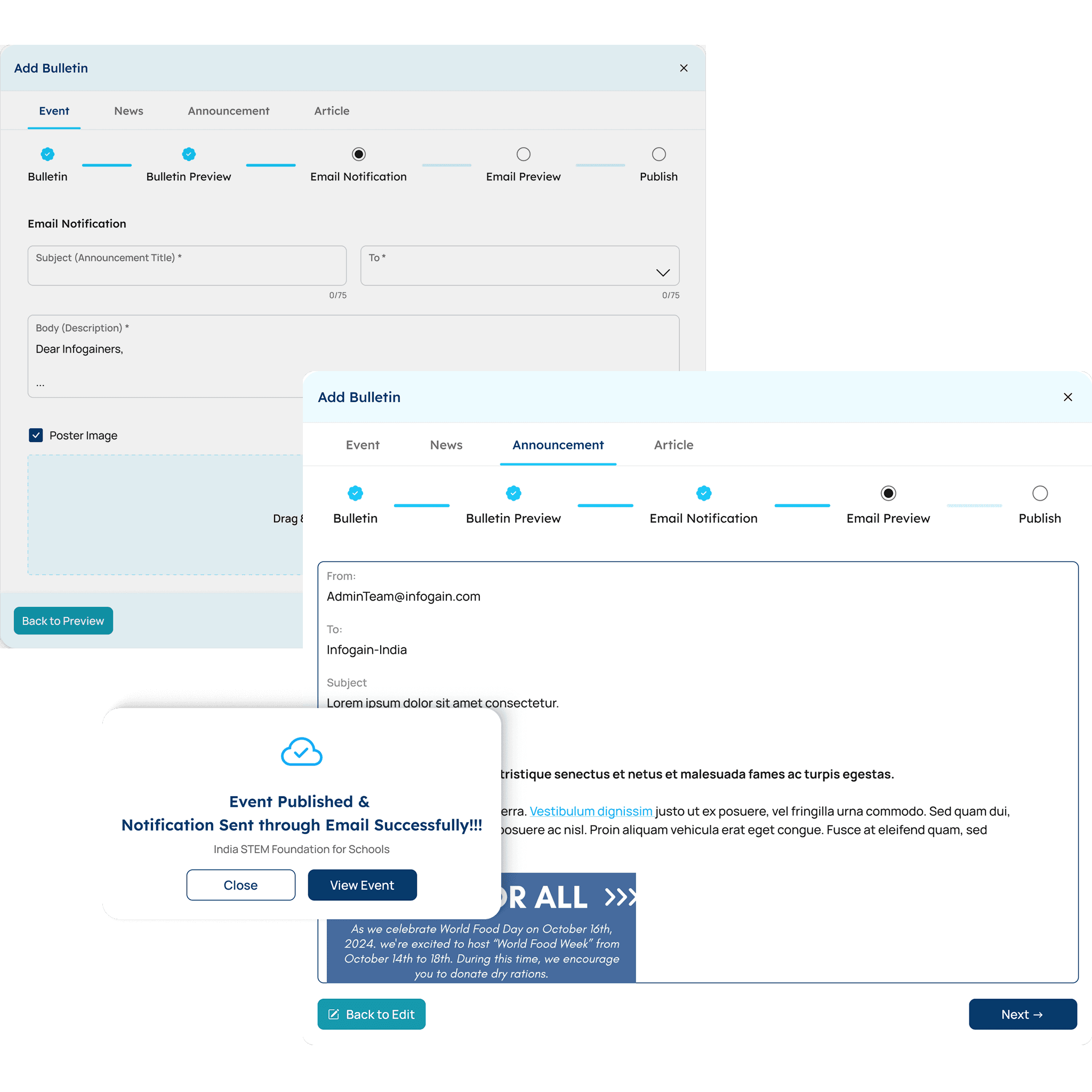
Admins can now create events, announcements, articles, or news directly from the CMS using a step-by-step guided workflow (bulletin → preview → email notification → publish).
Smart Notifications
Centralized Discovery
Engagement Features
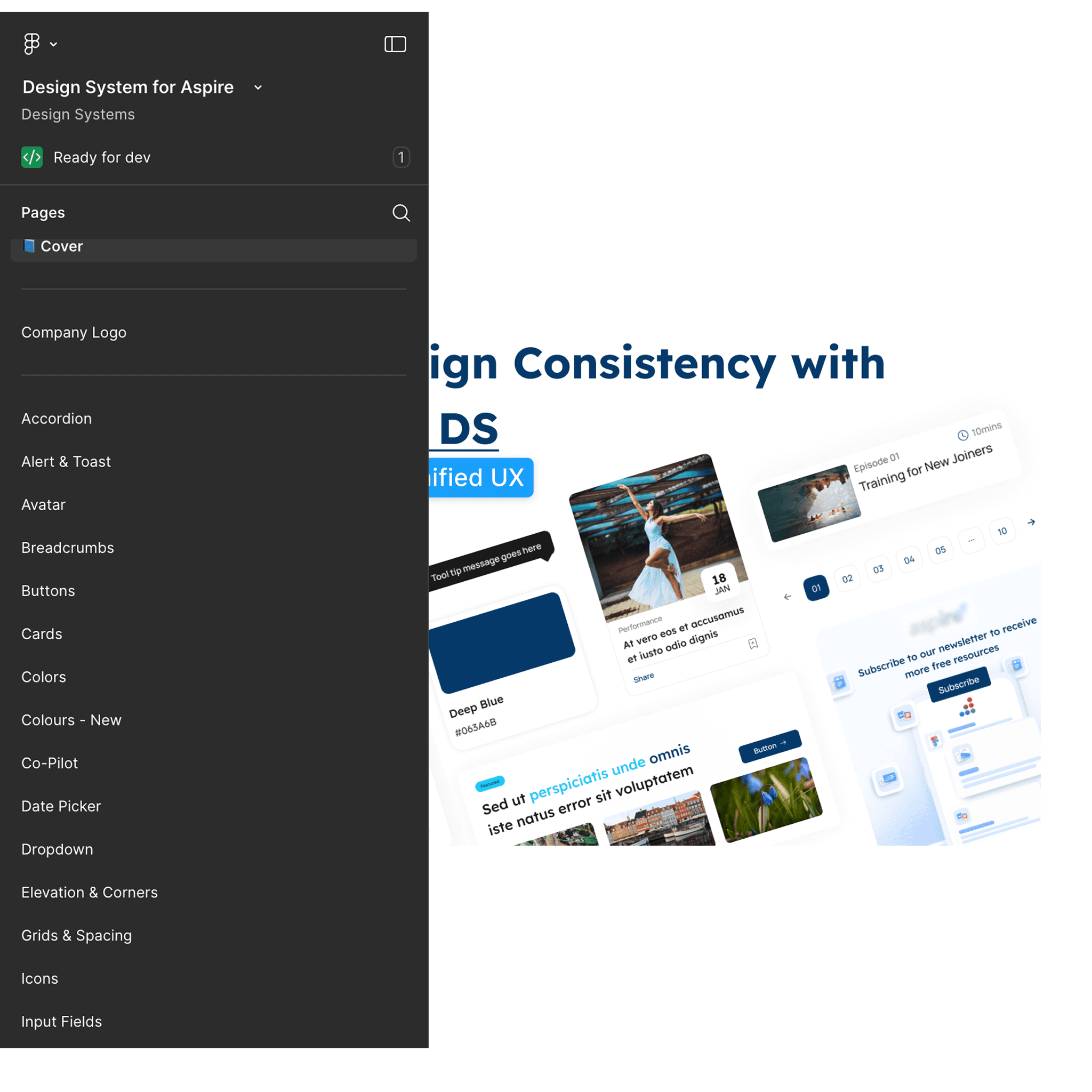
Consistent Design System
This shift from fragmented email communication to a structured, role-based CMS improved efficiency for admins and engagement for employees, creating a single trusted source of information within the organization.

The Design
🖼️ The Design - Dashboard
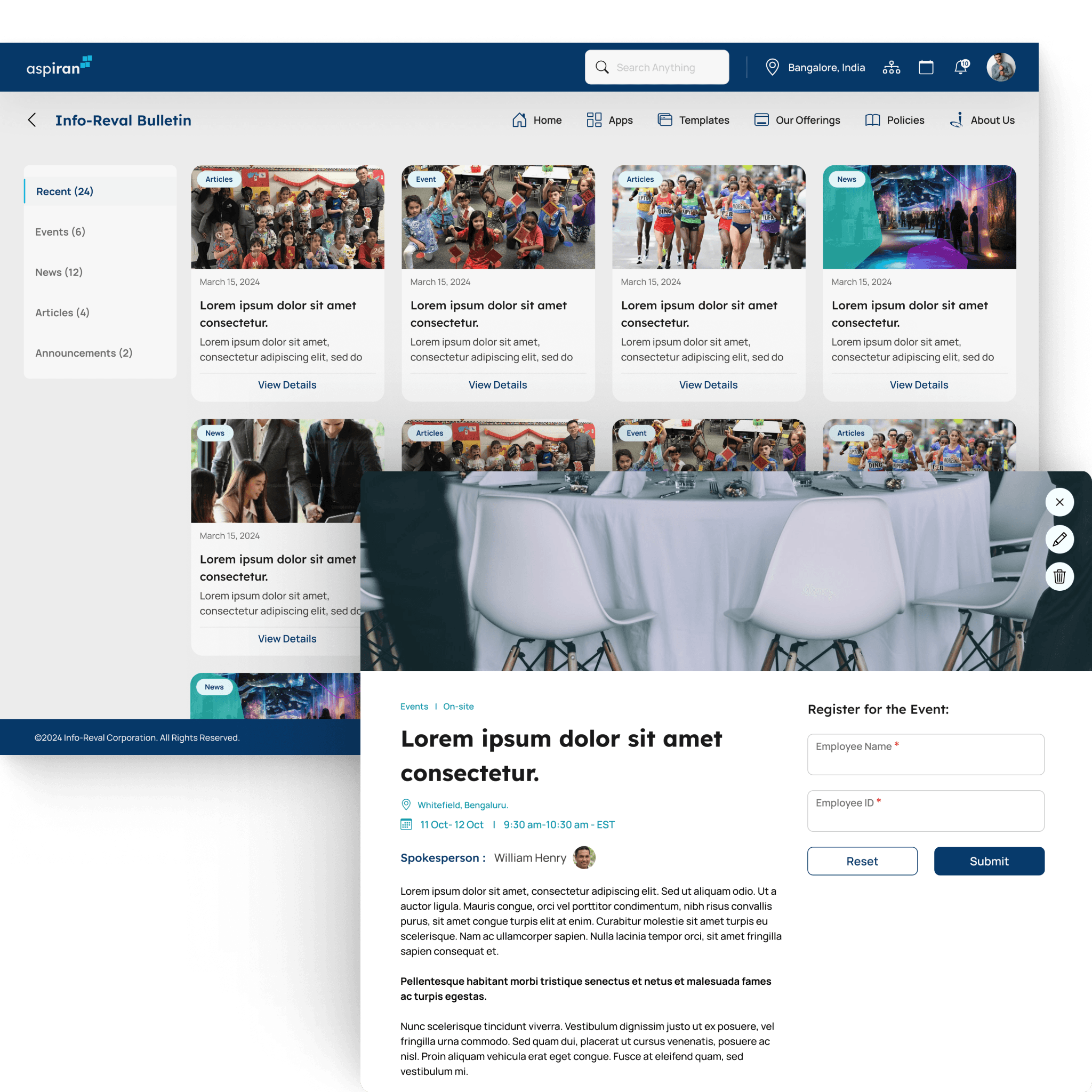
The dashboard was designed as the primary workspace for both Admin and HR users to manage internal communication efficiently. The goal was to provide a clear overview of all published and in-progress content while enabling quick access to key actions such as creating posts, reviewing updates, and managing visibility across the organization.

Quick Action’s
Actions such as managing drafts, Edit Post, reviewing pending updates & Delete Post - helping admins act faster without navigating multiple screens.
Create Post
Allows admins to quickly create events, announcements, news, or articles and publish them to the portal with the required approvals and notifications.
Easy Section Tabs
Simple category-based navigation (Recent, Events, News, Articles, Announcements) to help admins switch between content types and manage posts efficiently.
Overview of Published content
Displays all published and scheduled posts in a card-based layout, providing visibility into content status, key details, and quick edit or delete actions.
🧩
Content Creation Strategy
The CMS supports multiple content types—Events, News, Announcements, and Articles—each with a tailored creation flow based on its purpose. Instead of a one-size-fits-all form, the system adapts inputs and structure to match the type of communication, improving both efficiency for admins and clarity for employees.
Event
Structured & Interactive
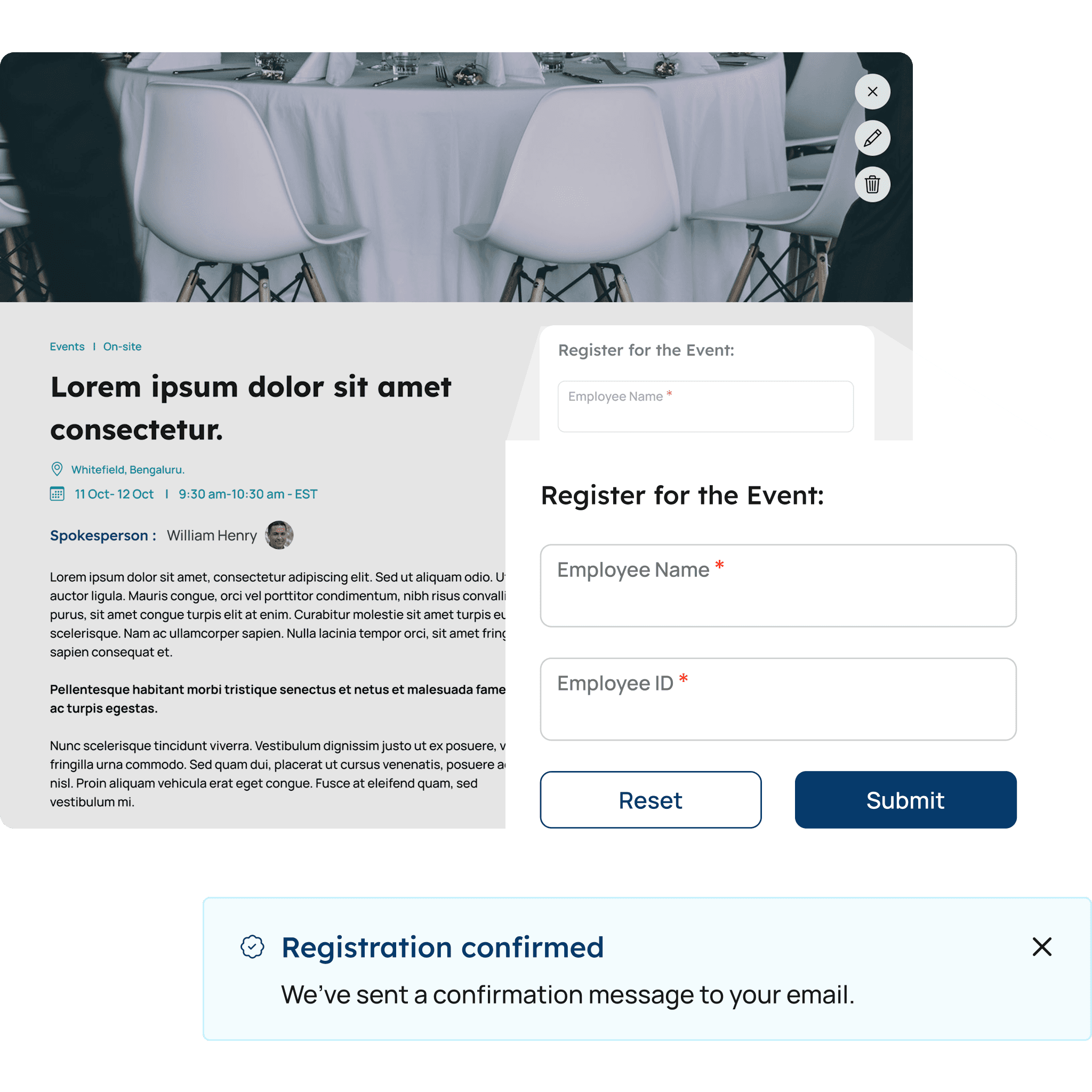
Custom registration forms (e.g., text, multiple choice, checkboxes).
Events require precise and actionable information such as date, time, location, and participation details. A structured, form-based approach ensures consistency, reduces errors, and makes it easier for employees to understand and act on event-related information.


News & Announcements
Quick Communication
Minimal fields like title and description, admins can publish information rapidly.
Updates are typically short, time-sensitive, and need to be communicated quickly. A simplified input structure allows admins to publish information rapidly without unnecessary friction, ensuring faster communication across the organization.
Article
Rich Content Editor
block-based content editor, allowing to create detailed and engaging content.
Articles are long-form and content-rich, similar to modern platforms like Medium. They require flexibility to add text, images, and media in a block-based format, enabling admins to create engaging and well-structured content rather than being restricted to rigid templates.

🎭 Create Event

Easy nav for different Bulletin
Clear tab-based navigation allows admins to switch seamlessly between Events, News, Announcements, and Articles without leaving the creation flow.
Progress bar
A step-by-step progress indicator guides admins through the creation process, setting clear expectations and reducing errors during publishing.
Email Notification
Admins can optionally trigger email notifications to ensure important updates reach the intended audience at the right time.
Spokesperson
Allows admins to add a designated point of contact for the event, providing employees with clear ownership and a reliable source for queries or follow-ups.
Event Details
Captures essential event information such as type (online or onsite), date, time, duration, and meeting link, ensuring clarity and consistency across all published events.
Form Field
Enables admins to create custom registration forms to collect relevant attendee information, supporting different event requirements without additional tools.
Crafting Experience that feel Effortless to be in
Have an Idea for a Product? Mail me at
Copyright @ Portfolio by Ram
Ramakrishnan Santhanam